Are you a WordPress user looking to improve your website’s credibility and trustworthiness with Google reviews? Or are you simply interested in finding the best WordPress Google review plugins for 2023? Look no further because we’ve got you covered.
In this article, we will be introducing you to the 8 Best WordPress Google Review Plugins for 2023, both free and paid options, to help you showcase your business’s excellent customer ratings and reviews.
Did you know that displaying customer reviews can increase conversion rates by up to 270%? That’s right, having positive reviews on your website can have a significant impact on your business’s success.
In this post, we will provide an overview of each plugin, highlight their features, and discuss what makes them stand out from the rest.
Last but not least, these plugins can be used for WordPress Reviews , Business Reviews, Google Review Slider, Google Reviews Widget, Facebook Reviews , TrustPilot Reviews , and Yelp Reviews . choose a plugin for your website that will transform it.
So, whether you’re a small business owner or an online entrepreneur, keep reading to discover the best WordPress Google review plugins and start incorporating customer reviews into your website today.
Best WordPress Google Review Plugins 🏆 Google Reviews Widget Plugin Everest Plugin WP Google Review Slider Plugin Google My Business Plugin WordPress Google Reviews & Ratings Plugin Google Places Reviews Plugin Premium Addons for Elementor Plugin Google Places Reviews Plugin FAQs ConclusionBest WordPress Google Review Plugins 🏆
When it comes to finding the best products, it can be overwhelming to sort through all of the options available on the market. That’s why we’ve compiled a list of top-performing WordPress Google review plugins, both free and paid.
So without further ado, here are the 8 best WordPress Google review plugins for 2023:
Google Reviews Widget Plugin
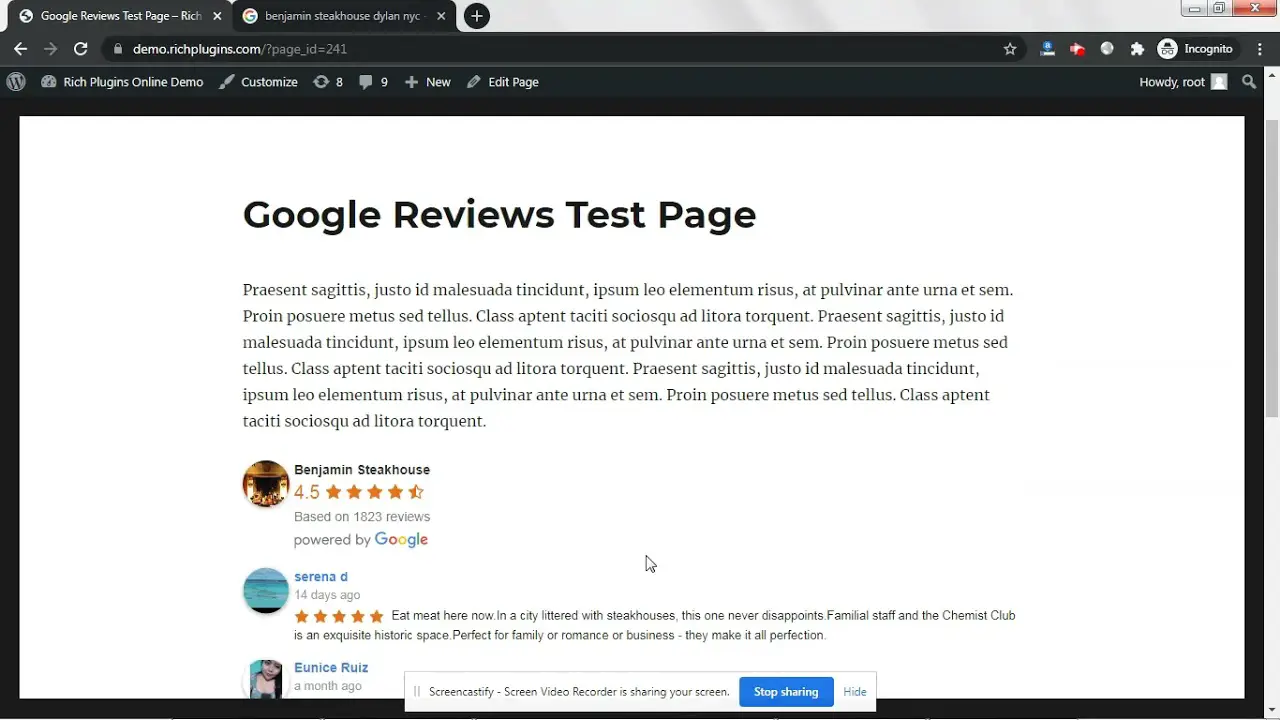

Simple Google Reviews Widget for WordPress
- Download Lite Version
- Download Pro Version
Google Reviews Widget is a plugin that allows you to display user reviews on your website’s sidebar. With over 80,000 active installations, this plugin is an excellent choice for those looking to showcase their customers’ experiences with their business.
This plugin automatically trims long reviews by minimizing the use of the Google Places API and storing them in WordPress. It’s also fully compatible with the Gutenberg editor and the Elementor page builder , which makes it easy to customize your site without having to learn how to code.
One of the most significant benefits of the premium version of this plugin, Business Reviews, is its ability to merge reviews from other platforms such as Facebook and Yelp .
Additionally, you can sort reviews based on recent, oldest, rating, striped, and random, making it easy to highlight the most relevant reviews for your business.
Key Features:
- Displays the sum of ratings for each location
- Option to hide low-rated reviews
- Create your own rating template
- Allows visitors to write reviews directly on the WordPress site
- Increases number of Google, Facebook, and Yelp reviews
- Reviews are rendered directly in HTML.
Screenshots & Video:
Everest Plugin
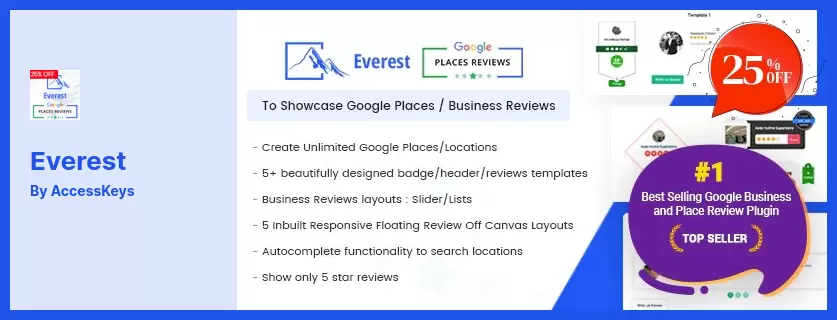
Best WordPress Plugin To Showcase Google Places / Business Reviews
- Download Everest
Everest is a Google review plugin for WordPress that offers easy integration with shortcodes and widgets. It works based on 5-star ratings, which can be presented in various layouts such as sliders and lists. There are five different responsive layouts to choose from, making it possible to view the reviews on mobile devices and desktops.
One of the notable features of Everest is a ‘Rate Us’ button that can be added to your website, providing new users with the opportunity to rate and give feedback about your website. This feature could be very helpful in improving the conversion rate of the site.
The profiles of users who have already written reviews can also be customized, allowing you to hide their profile pictures if desired. Additionally, the number of words allowed in each review can be limited, ensuring that all reviews are concise and to the point.
Overall, Everest is a premium WordPress plugin that offers great value for businesses looking to integrate Google reviews into their website. With its user-friendly interface and customizable features, it’s definitely worth considering.
Key Features:
- Unlimited Google Business Places
- 10 pre-designed review templates are available
- Option to display only 5-star reviews
- Five attractive layouts for floating reviews
- User reviews displayed up to 5 using Google Places API
- Customizable review title and description.
Screenshot:
WP Google Review Slider Plugin

Google Reviews Slider for WordPress
- Download Lite Version
- Download Pro Version
WP Google Review Slider is a plugin that can significantly enhance your website’s SEO by displaying Google reviews. With this plugin, you can display up to five reviews each day, and any new reviews will replace the old ones automatically.
You can customize the display of the reviews by changing the text color, and background, or hiding the date. Moreover, you can use a shortcode , widget, or PHP template function to display the slider on your website or avoid negative reviews.
The plugin comes with more advanced features in the premium version, including multiple languages, locations , and a social media counter. You can also download all Google reviews from different locations and create an overall review slider.
Furthermore, WP Google Review Slider allows you to manually add reviews and summarize a review for a WooCommerce product, or you can use a WooCommerce review plugin.
The Lite version of the plugin is free, while the premium version requires payment. Overall, WP Google Review Slider is a fantastic option to showcase your business’s positive reviews and improve your website’s SEO .
Key Features:
- Customizable templates for displaying Google Places reviews
- Show/hide rating stars and dates in templates
- Create a slider with your Google Places reviews
- Select which reviews to display based on their rating
- Ability to create multiple templates for posts, pages, and widgets
- Display multiple Google Places reviews in each row.
Screenshot:
Google My Business Plugin

Google Reviews and Rating For WordPress
- Download Google My Business
Google My Business is an excellent plugin that enables website owners to add Google Business reviews to their websites. This plugin is perfect for those who want to showcase their customers’ experiences with their business.
The plugin takes your Google Places ID, collects the necessary data, and displays a well-designed list or block of reviews on your website.
One of the best things about this plugin is its user-friendliness – you don’t need any programming knowledge to use it. You can easily use shortcodes and widgets to customize the appearance of the plugin to match your website’s theme.
Additionally, the plugin comes with over 20 pre-designed layouts, perfect for finding the one that suits your preferences.
With Google My Business, you can even add links and Google Maps listings associated with each review. This allows potential customers to see precisely where the reviewer experienced your service or product, increasing the legitimacy of the review.
Furthermore, you have control over customizing the template, text, date, and other elements of your reviews. This means that your reviews will look great on your website, matching your branding seamlessly.
Key Features:
- Customizable columns for reviews
- Structured data support for search engines
- Flexible review list settings
- Supports RTL language and styles
- Review management and selective hiding
- Custom ordering within review items.
Screenshot:
WordPress Google Reviews & Ratings Plugin

WordPress Support for Google Reviews & Ratings
- Download WordPress Google Reviews & Ratings
WordPress Google Reviews & Ratings is a plugin that allows you to display up to five Google Places reviews on your website. This plugin automatically updates the old reviews with the new ones as they come in, making it a hassle-free experience for website owners.
Visitors and customers can leave their reviews directly on your website, which can either act as a positive reinforcement for potential customers or dissuade them from making a purchase.
This plugin offers added flexibility by allowing customization via widgets and shortcodes. The responsive design ensures that your Google Reviews are accessible on any device or screen size. You can also add a “show all reviews” button if you wish to display more than five reviews.
Overall, this plugin is an excellent plugin for businesses who want to showcase their customer feedback while building trust with potential customers. With its automatic fetching feature and customizable options, it’s definitely worth considering for your website.
Key Features:
- Write a Review Button on your website
- Allows customers to leave comments and ratings
- Improves brand awareness
- Retrieves the five most helpful reviews through API requests
- Convinces customers with positive user reviews
- Saves time by showing positive testimonials.
Screenshot:
Google Places Reviews Plugin



WordPress Support for Google Places Reviews
- Download Google Places Reviews
Google Places Reviews is a powerful plugin that can help your website improve its ranking in Google and Bing. This plugin allows you to easily add reviews and testimonials left by previous customers to your website, which can help build your reputation and attract new customers.
Using Google Places Reviews Pro, you can display these reviews on your website via widgets and shortcodes. The plugin’s high SEO enhancement techniques ensure that local clients can easily find you, leading to an improved conversion rate and sales .
The plugin comes with several useful features, including customizable shortcodes that allow you to make changes to the display of your reviews. Additionally, the plugin is easy to use and integrates seamlessly with your website.
Overall, if you’re looking to improve your website’s search engine ranking and attract more customers, Google Places Reviews is an excellent choice. With its powerful features and easy-to-use interface, this plugin can help take your business to the next level.
Key Features:
- Boosts brand’s fame
- Increases sales and revenue
- Boosts customer loyalty and trust
- Save time showing testimonials
- Showcase customer opinions
- Spread brand awareness globally.
Screenshot:
Premium Addons for Elementor Plugin

Over 60 Highly Customizable Elementor Essential Addons
- Download Lite Version
- Download Pro Version
Premium Addons for Elementor is a fantastic plugin that enhances the functionality of your Elementor page builder with over 50 customizable add-ons and widgets. Even without any technical programming knowledge, you can create a website that looks impressive.
With over 500,000 active installations, it is one of the most extensively used Google reviews plugins for WordPress. The plugin works exceptionally well with WPML, and it is also compatible with WordPress Multisite .
While the free version only supports testimonials, it can be customized to showcase user reviews in a carousel. However, when you opt for the premium version, you’ll receive access to Google, Facebook, and Yelp reviews.
In the free version, you can use widgets like Google Maps Widget , Blog Widget, Carousel Widget, and Persons Widget. But, if you want advanced widgets like Widget Tabs and Content Switcher, then you’ll have to upgrade to the premium version.
The Lite version of this plugin is completely free, which is excellent for those who need basic functionality. However, if you want more features, the Pro version is available at an affordable price.
Key Features:
- Displays Facebook reviews in Elementor
- Shows the latest Google Reviews in WordPress Page Builders
- Integrates Yelp reviews on website pages
- Enable/disable elements for better site performance
- Customize display based on location and browser
- Improves website credibility with social proof.
Screenshot:
Google Places Reviews Plugin
WordPress Support for Google Places Reviews
- Download Lite Version
- Download Pro Version
Google Places Reviews is a highly recommended plugin for WordPress users who want to showcase their brand’s credibility to visitors. This plugin provides a platform for customers to leave reviews about your products or services, which can help build trust with potential clients.
With over 5000 active installations, Google Places Reviews offers various widgets that enhance the user experience.
The plugin is particularly useful for businesses such as restaurants , online shops, review sites, and real estate agencies. By displaying positive reviews, you can improve the conversion rate of your website.
The free version of this plugin allows you to add up to three reviews on your site, whereas the premium version allows for up to five reviews.
One of the most impressive features of Google Places Reviews is the availability of multiple pleasing layouts. You can choose from different designs that match your brand’s aesthetic to make your page more visually appealing.
Overall, this plugin allows you to showcase your business’s credibility by leveraging your customer’s reviews.
Key Features:
- Displays up to three reviews per location
- Utilize Google search using Places Autocomplete
- Integrates with website design using widget themes
- Compatible with light and dark color schemes
- Shows business information, including name and website
- Regular updates to ensure compatibility and reliability.
Screenshots & Video:
FAQs
What are Google review plugins for WordPress?Google review plugins for WordPress are tools that allow website owners to display customer reviews from their Google My Business page directly on their WordPress website. These plugins can help build trust and credibility with potential customers by showcasing positive experiences from existing customers.
What are the benefits of using a Google Review Plugin for WordPress?Google Review Plugins can help you showcase reviews from your customers, which can build trust and credibility with potential buyers. They can also help improve your SEO by adding fresh content to your website and increasing user engagement.
What features should I look for in a paid Google Review Plugin?When choosing a paid Google Review Plugin, look for features like customization options, advanced filtering and moderation tools, and integration with other platforms. You may also want to consider the level of support provided by the plugin developer.
Can I show Google reviews on my WordPress site without using a plugin?It is possible to display Google reviews on your WordPress site without using a plugin, but it may require some coding knowledge. You would need to use the Google Places API to retrieve the reviews and then add them to your site manually. Using a plugin can make this process much simpler and more streamlined.
How do I choose the best Google review plugin for my WordPress site?When choosing a Google review plugin for your WordPress site, consider factors such as price, compatibility with your WordPress theme and other plugins, ease of use, customization options, and the specific features that are most important to your business needs. It may be helpful to read user reviews and compare different plugin options before making a decision.
Conclusion
In conclusion, we have discussed the top 8 WordPress Google review plugins, both free and paid. These plugins can help you display your Google reviews on your website and enhance your online credibility.
Thank you for taking the time to read this article. If you have any questions or concerns about the topics we covered, please feel free to ask in the comments section below. We value your feedback and are always happy to help!
Please Share This:Common questions
What is a Google review plugin for WordPress?
It's a plugin that connects a WordPress site to Google review data, to other review platforms, or to its own review form, and handles one of three jobs: showing reviews that already exist, combining reviews from several platforms into a single feed, or collecting new reviews directly from site visitors. Which of those three jobs a site needs determines which category of plugin is the right fit.
Do I need a Google API key to show Google reviews on my WordPress site?
Most plugins that pull live reviews from a Google Business Profile need a Google Places API key, created through a Google Cloud project, which can require billing to be enabled even if usage stays within a free tier. Plugins that only collect reviews on-site, rather than importing them from Google, don't need this.
Can a WordPress plugin let me reply to Google reviews?
No. Display and aggregation plugins only show reviews that already exist; replying to a review still has to happen inside the Google Business Profile account itself. Be cautious of any plugin that claims to manage replies from within WordPress.
Will showing live Google reviews slow down my site?
It can, if the plugin calls the Google API on every page load instead of caching results. Check that any plugin stores reviews locally and refreshes them on a schedule rather than fetching live data for every visitor.
Can visitors post a new Google review directly from my WordPress site?
Not directly. A plugin can link or redirect visitors to a Google review page, or collect a review on the site itself, but a new review can only be published into Google's own system through Google, not through a third-party plugin.
Sources
About this page
Last reviewed October 30, 2026 by the Better Studio editors. Read our editorial policy or report an error.